mrg-iot run
The whole experiment lifecycle in one guided, interactive command: set up, use, tear down.
Usage
mrg-iot run
run takes no flags. It asks for everything it needs as it goes. To script an experiment instead, use the exp, cmd, stream, and file commands, which never prompt.
Details
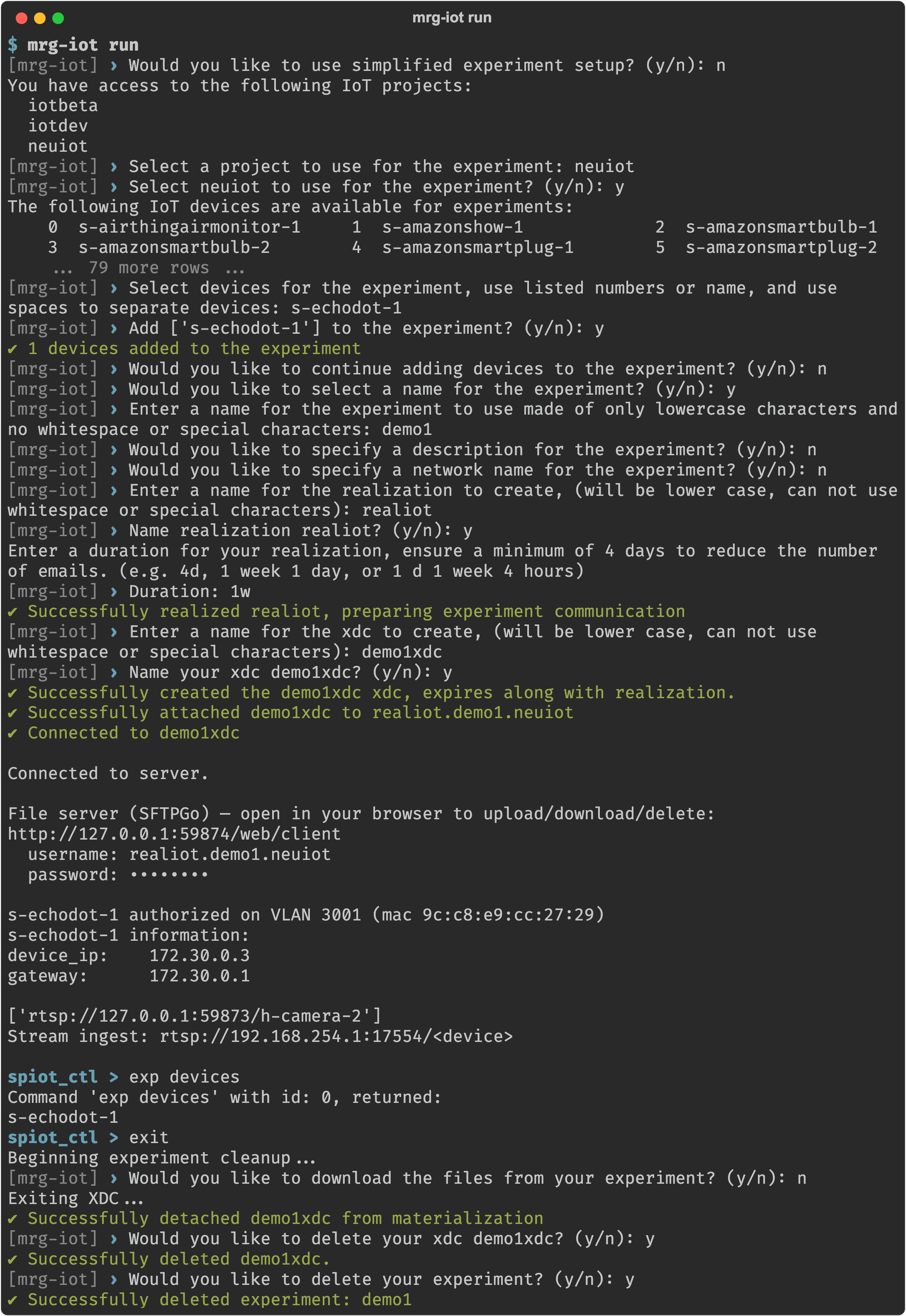
run is the one command that asks questions. It:
- Shows a numbered list of your projects and the free devices, and asks which you want.
- Provisions an experiment with them.
- Opens VLC viewers for any cameras.
- Drops you at the
spiot_ctl >prompt with the experiment's banner: its devices, cameras, and file-server login. - When you type
exit(or press Ctrl-C), offers to download the experiment's files and cleans up.
run can keep your experiment
On exit run always detaches the XDC, then asks whether to delete the XDC and whether to delete the experiment. Deleting the experiment also releases its hardware. A kept experiment keeps its realization and materialization, so it goes on holding the hardware until you run exp teardown or its duration runs out. To use it again, reattach an XDC with exp xdc attach.
Example
mrg-iot run
Back to the full walkthrough: Using mrg-iot.