Troubleshooting & FAQ
Common mrg-iot errors, with the symptom, cause, and fix, plus answers to the questions that come up most.
Issues are grouped by where they occur: install, login, provisioning, connections, device commands, streams, and files. If you don’t find yours, jump to Still stuck?.
First: turn on tracing
Tracing is controlled by the environment, so it is a property of your shell session rather than of one invocation:
MRG_IOT_TRACE=1 mrg-iot exp status myexp
That raises the log level to DEBUG and echoes every record to stderr. To keep your terminal readable, send the trace to a file instead:
MRG_IOT_TRACE=1 MRG_IOT_TRACE_FILE=/tmp/mrg.log mrg-iot exp status myexp
Logs are always written to ~/.mrg-iot/debug.log regardless. Attach that file and the output of mrg-iot --version to any bug report. See Logs and tracing for the details, and Exit codes for what each exit status means.
Installation & environment
Install steps themselves live on the Installation page.
mrg-iot: command not found after install
pipx installs to ~/.local/bin, which may not be on your PATH:
pipx ensurepath
Open a new shell and confirm with mrg-iot --version. Requires Python 3.9+.
SSL / certificate errors on macOS
Symptom: portal calls fail with certificate verify failed when talking to grpc.sphere-testbed.net. macOS Python often ships without a usable CA bundle.
export SSL_CERT_FILE="$(python -m certifi)"
export REQUESTS_CA_BUNDLE="$SSL_CERT_FILE"
Add both lines to your shell profile to make them persistent. mrg-iot detects this case and prints the same two lines when it happens.
“Could not resolve a testbed hostname”
DNS could not resolve grpc.sphere-testbed.net or jump.sphere-testbed.net. Check your network connection, and any VPN or split-DNS configuration.
Installing the dev tools fails on Python 3.9
The runtime supports 3.9+, but the dev extras (black, pylint, isort) require 3.10+. On a 3.9 environment install runtime dependencies only: pip install -e . or pip install -r requirements/prod.txt.
Authentication & sessions
Your session lives at ~/.mrg-iot/session.json (mode 0600).
“Login failed”
The portal rejected the attempt. In order of likelihood:
- Wrong username or password: re-run
mrg-iot login. - Account not yet approved: a registered identity is not the same as an approved portal account. See Research Accounts.
- Portal unreachable: check access to
grpc.sphere-testbed.net:443.
You log in fine, but no projects are listed
Your account isn’t a member of an IoT project yet. Request membership in neuiot (or iotbeta / iotdev) through the portal or from the NEU IoT Facility. See Using mrg-iot §1b.
“Already logged in as <user>”
To switch accounts:
mrg-iot logout
mrg-iot login
A command won’t stop asking for credentials in a script
If credentials are needed, none are cached, and stdin is not a terminal, mrg-iot exits with an explanation rather than hanging. Supply them through the environment:
export MRG_IOT_TOKEN=<token>                 # preferred in shared CI; revocable
# or
export MRG_IOT_USERNAME=<user> MRG_IOT_PASSWORD=<pass>
A rejected password fails immediately rather than retrying, since there is nothing to re-prompt.
Provisioning & resource conflicts
The name already exists
An earlier run left the experiment, realization, or XDC behind. Either release it:
mrg-iot exp teardown myexp     # undeploy + delete, in one command
mrg-iot exp undeploy myexp     # release the hardware, keep the experiment record
…or pick a different name, or delete it through the portal at launch.sphere-testbed.net.
teardown and undeploy are safe to re-run: a resource that is already gone is reported as skipped, not as a failure, and the command still exits 0.
Which verb releases what is in the group’s own help. undeploy stops before deleting the experiment record, teardown doesn’t:
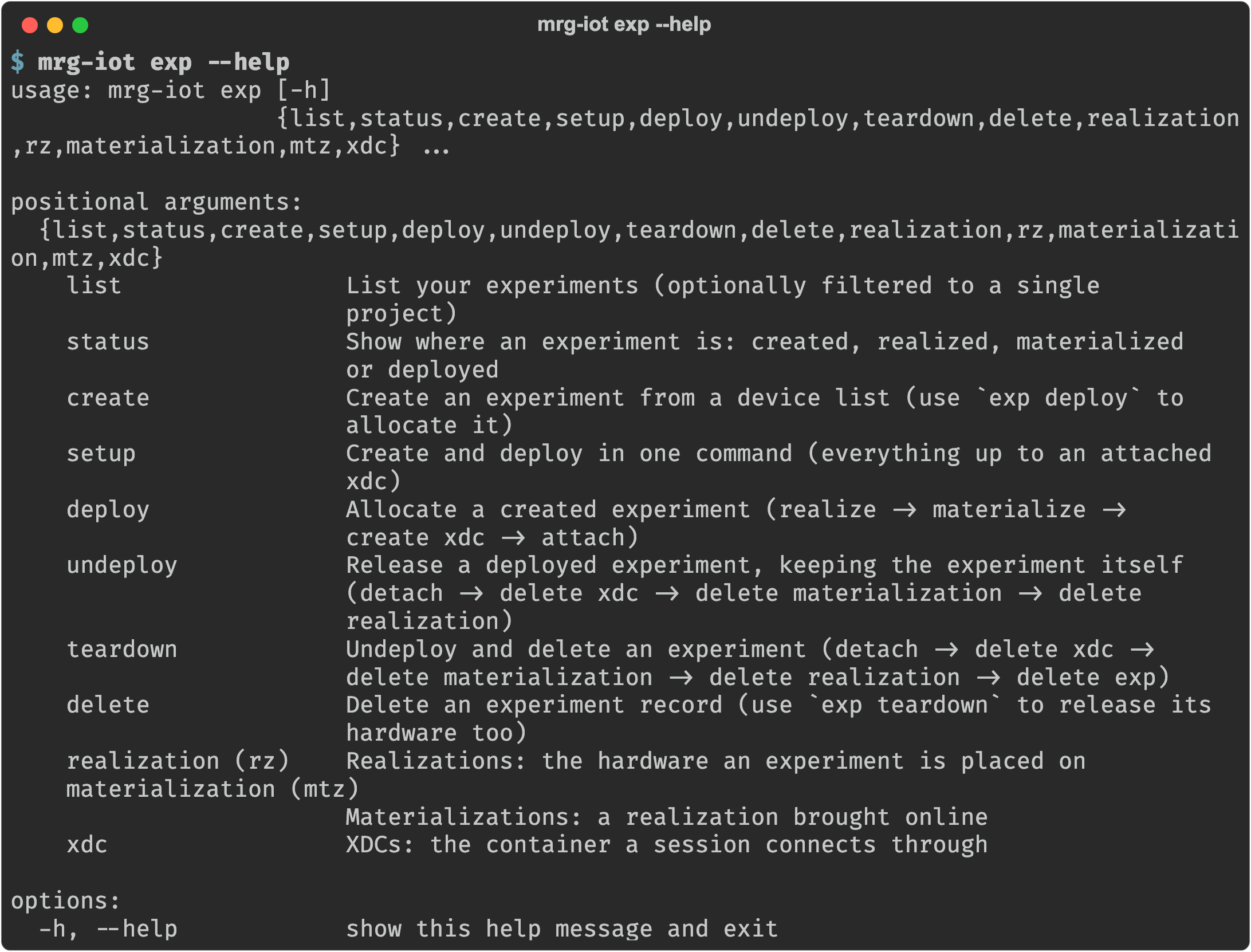
To see what exists first:
mrg-iot exp list               # your experiments; --all for everyone's
mrg-iot exp status myexp       # created / realized / materialized / deployed
Interrupting with Ctrl-C (exit 130), or answering no when mrg-iot run asks whether to delete the XDC and experiment, keeps everything so you can reconnect. Nothing is cleaned up automatically; it holds hardware and counts against your quota until its duration expires.
“Invalid <field>: Must start with a letter, lowercase letters and numbers only, no spaces”
Names you pick (experiment, realization, XDC, network) must match ^[a-z][a-z0-9]*$:
- start with a lowercase letter
- lowercase letters and digits only, with no hyphens, underscores, spaces, or capitals
- max 32 characters
This does not apply to device identifiers like s-echodot-1; those come from the testbed and you pass them through as-is to --devices.
Descriptions allow letters, digits, spaces, commas, periods, and hyphens (max 256).
“The duration is invalid … at least 4 days”
The minimum is 4 days. 4d, 1w, 1w2d3h, and 1 week are all accepted; the default is 1w. Expiry notices go out 3 days before XDC expiry and 1 day before realization expiry, so 4 days is also the practical minimum for getting any warning.
exp create -d d1 d2 myexp reserves three devices and no experiment name
--devices is greedy, so it swallows the name. Put NAME before the flag:
mrg-iot exp create myexp -d d1 d2
Leaving --devices off entirely is the easier mistake to spot, because argparse refuses it outright rather than building a model from nothing:

The XDC never becomes ready (exit 7)
Provisioning waits up to ~5 minutes for the XDC to start accepting connections, and gives up with exit 7 if it doesn't. An XDC that never came up is deleted rather than left behind, so this does not leave a half-built one holding your quota, and the name is free to use again immediately.
If the infrastructure is simply busy, retry:
mrg-iot exp teardown myexp     # clear anything the failed attempt did allocate
mrg-iot exp setup myexp --devices s-echodot-1
If it fails twice, report it to the NEU IoT Facility with the output of MRG_IOT_TRACE=1 mrg-iot exp deploy myexp — a busy testbed and a broken one look the same from here.
A named default points at nothing
Errors of the form “no such experiment jsmith” usually mean a derived default was used: the experiment defaults to your username, the XDC to <experiment>xdc, and the realization to realiot. The message names what it tried and which flag overrides it.
Connections, sessions & tunnels
Each command opens its own SSH session for as long as it runs and closes it afterwards, so a connection problem affects only the command that hit it.
“SSH to the xdc failed”
The XDC is not reachable. Confirm the experiment is actually deployed and the XDC is attached, then retry:
mrg-iot exp status myexp
If it says materialized rather than deployed, the XDC isn’t attached yet.
“Could not connect after N attempts”
mrg-iot reached the XDC but not the ExperimentControl server on port 17000, usually because the experiment is still materializing, or it crashed. Check exp status, wait, and retry.
A command hangs, then times out
Re-run with MRG_IOT_TRACE=1 and watch stderr, or read ~/.mrg-iot/debug.log, for the underlying gRPC or SSH error. Device commands are given up to 5 minutes.
“The portal rejected a request”
A gRPC error came back from the portal. The message includes the portal’s own text. If it persists, contact a testbed administrator with the relevant lines from debug.log.
Device commands
These come back from the experiment, not from mrg-iot, because the experiment validates its own input.
“Invalid action type, specify a device (prefixed with ’s-’), exp, or query”
Every command must start with a device id (s-…), exp, or query. Check the leading token: s-echodot-1 click_button, not echodot-1 click_button.
“Command: <cmd> not found”
The device doesn’t support that command, or the device name is wrong. Capabilities differ even between two devices of the same model, so ask the device:
mrg-iot cmd run "s-echodot-1 commands" -e myexp
mrg-iot cmd run "s-echodot-1 click_button help" -e myexp
“Insufficient arguments provided, (minimum 2)”
A command needs at least a category and a name: exp devices, not devices. For device commands, <device> <command> help shows the required parameters.
“Variable <name> not stored in memory”
You referenced a variable (leading _) that was never set. Store it first. The -s flag takes a reference and then a variable name, where the reference is id, result, or state:
s-echodot-1 -s id job click_button
query wait_result s-echodot-1 click_button _job
query returns nothing
query commands take exactly three arguments and the job id must be digits. get_result returns nothing until the job’s state is complete, so use query wait_result to block until it finishes, or poll query state first. In practice you rarely type these: cmd run sends wait_result for you, and cmd wait / cmd status are the same verbs addressed by task handle.
A task handle stopped working
Handles are forgotten when their experiment is torn down (exp undeploy, exp teardown, exp delete), because a redeployed experiment starts counting job ids from 0 again and a surviving handle would ask about one job and be answered about another. A handle that is no longer on record fails immediately and locally; no session is opened to find that out:

mrg-iot cmd tasks lists what is still on record.
cmd tasks shows no state for each job
By design, since showing it would cost one round trip per row. mrg-iot cmd status t1 is the command that asks.
Camera streams
stream open does nothing, or errors
VLC must be installed and on your PATH. Confirm with vlc --version; pip and pipx cannot install it.
| Platform | Command |
|---|---|
| macOS | brew install --cask vlc |
| Debian / Ubuntu | sudo snap install vlc |
| Fedora | sudo dnf install vlc |
| Windows | Download from videolan.org |
On Debian and Ubuntu, the apt build of VLC can't play RTSP streams, so use the snap.
To use a different player, mrg-iot stream url prints the RTSP addresses and keeps forwarding them until Ctrl+C.
VLC connects but shows nothing
Check for an editor forwarding the same port. VS Code’s automatic port forwarding binds 127.0.0.1:<port> and shadows the tunnel for anything connecting to localhost. Remove the entry from its Ports panel, or set "remote.autoForwardPorts": false.
stream list prints <port> instead of a number
That is the literal output. The port is assigned per session, so there is no number to print until a session exists. Run stream url for the real addresses, or stream open to watch them.
The stream closed when the command exited
Expected. A stream is continuous, so the command has to keep running to hold its tunnel open. Closing the command closes the feed.
“A stream push is already publishing to <device>”
A device takes one stream at a time, and another stream push on your machine is still sending to it. Stop that one with Ctrl-C, or push to a different device. Pushes to different devices can run at the same time.
stream push prints an address but nothing plays
ffmpeg wasn't found, so nothing is being published. Install it (see Installation), or publish to the printed address with another RTSP publisher and then run mrg-iot cmd run "<device> start_streaming". The address works only while stream push keeps running.
“Wireshark was not found”
stream capture opens Wireshark by default. Install it (see Installation), or skip it: --write capture.pcap saves the traffic to a file, and --write - | tshark -r - pipes it to another tool.
“Could not reach the experiment's live capture”
The hint underneath says which case it is. If the SSH tunnel to the XDC dropped, run the command again. If nothing answered on port 17555, the experiment doesn't offer a live capture; its recorded .pcap is still available with mrg-iot file download once the run ends.
“The experiment ended the capture without sending anything”
Almost always an invalid --filter. It takes tcpdump capture-filter syntax ("udp port 53", "host 10.0.0.5 and tcp"), not Wireshark display-filter syntax (dns, ip.addr == 10.0.0.5).
“Camera … is unreachable”
The backend probes each camera before proxying it; one that is offline or still booting is skipped and the others are unaffected. Give the device time, or confirm it actually has a camera. mrg-iot devices info pairs each device with its camera, and mrg-iot stream list names them.
Files
file download can’t find your file
Names are the file server’s, not your shell’s: no globbing, and a path is relative to the share’s root, never to your machine. List it first and use the name printed:
mrg-iot file list -e myexp
mrg-iot file list output -e myexp
The downloaded file has a strange name
That is the naming scheme: <experiment>.<remote path>, with every / turned into a ., so output/capture.pcap from experiment myexp arrives as ~/Downloads/myexp.output.capture.pcap. It keeps the experiment and the source directory in the name so two files with the same basename don’t overwrite each other. Pass --output/-o for a name of your own. An -o path without an extension is treated as a directory and created if needed.
file upload put the file somewhere unexpected
Uploads always go to uploads/, because the share’s root is read-only for the experiment’s file-server user. upload and remove work in the root only.
file download with no name gives me a .zip
Also expected: output can only come back through the web client’s zip endpoint, so it lands as <experiment>.output.zip. Name a single file to get it verbatim.
Nothing was captured
The output archive always contains at least a log file and a .pcap. Anything else depends on the commands you ran. If the archive is missing entirely, confirm the experiment was materialized long enough for capture to start.
FAQ
Do I need an SSH key, or the mrg CLI? No. mrg-iot talks to the portal itself and fetches the SSH key it needs for the XDC automatically.
Can I drive one experiment from several terminals? Yes. Sessions are cheap and independent, because every local tunnel port is ephemeral. Run stream open in one, cmd shell in another, and file download in a third.
Does anything run in the background between commands? No. Each command opens its session, works, and closes. The only thing kept on disk is your login, the debug log, and task records from cmd async-run.
How do I script this without any prompts? Use the exp, cmd, stream, and file commands. Everything except mrg-iot run is already non-interactive: anything you omit is derived rather than asked for. run is the guided, interactive option.
Why did my experiment name default to my username? That’s the rule: --experiment defaults to your username, --xdc to <experiment>xdc, and --realization to realiot.
What is the minimum reservation? 4 days. The default is 1 week.
Which projects have IoT hardware? neuiot (production), iotbeta (pre-release), iotdev (facility development).
Still stuck?
- Check the experiment’s state from the portal at launch.sphere-testbed.net, or with
mrg-iot exp status <name>. - Re-run with
MRG_IOT_TRACE=1and read~/.mrg-iot/debug.log. - Report the issue to the NEU IoT Facility with those log lines and the output of
mrg-iot --version. IoT support is in beta and feedback is welcomed.