Features
A Merge Portal has a number of features that can be enabled at runtime. This document describes them and how to enable and configure them.
Demonstration Mode
On a Merge Portal, experiments (realizations) always exist in the context of a Project. If an experimenter wants to run an experiment, it is created within a specific project. When a user account is created on a Merge Portal, a "personal" project is created for the user. This project is named with the user's username. So a user account with username "murphy" will get a project named "murphy". Merge does this so users can start to create experiments immediately - they do not need to create or join an existing project to get work done.
If the Demonstration Mode is active on a Merge Portal, the user has a limited time to create new experiments (realizations) in their personal project. After the Demonstration Mode expires, the user is forbidden from realizing a new experiment in their personal project. They can only realize experiments in existing projects or projects they have created.
Configuration
Demonstration Mode is configured via environment variables in the apiserver service of a Merge Portal.
DEMO_MODE- if this variable exists and is set to a "true" value, then Demonstration Mode is enabled. True values are: "1", "t", "T", "true", "TRUE", "True".DEMO_DURATION- how long the user can use personal projects for experiments. The format is a duration of repeatedNumberUnitvalues. WhereNumberis an integer, andUnitis a time unit. Units arew(weeks),d(days),h(hours),s(seconds). For example1w2d3h4m5sis one week, two days, three hours, four minutes, and five seconds. Any unit may be left out.2dis two days. If this variable is not set, the portal uses a default value of two weeks.
The Demonstration Mode expiration is per-user. When a new account is created, the expiration time is set based on DEMO_DURATION or the default value. Portal
operators can set the Demonstration Mode expiration for a user via the mrg command line utility. The command is mrg update user demoexp ....
Usage:
$ mrg update user demoexp -h
Update a user's demo expiration duration. Format is NwNdNhNs, where N is an integer and w=week, d=day, h=hour, and s=second. Any field can be missing

Usage:
 mrg update user demoexp <username> <duration> [flags]

Flags:
 -h, --help   help for demoexp
For example, to set the user murphy demonstration mode to expire in 5 days: mrg update user demoexp murphy 5d. The special value NEVER can be used
to disable demonstration mode for a user. mrg update user demoexp murphy NEVER would disable this for murphy.
This command is only authorized for use
by accounts with user.updatestate permissions in the portal policy. This is usually portal and organization maintainers. Portal maintainers can update all users.
Organization maintainers can only update users that are in projects in the organization they maintain.
Automatic Deletion
The portal can be configured to automatically delete portal entities after a given time. This is currently only implemented for Realizations and XDCs. Before they are deleted, the Portal can be configured to send emails to interested parties, warning of the eminent deletion.
Configuration
This feature is enabled and configured via environment variables for the given service. realize for realizations and xdc for XDCs. The environment
variables are the same in all cases.
EXPIRATION_WARNING_DURATIONS- If emails are enabled, when to send warning emails to users. The format is a comma separated list of durations. For example,72h, 24h, 1hwill make the portal send warning emails 72 hours, 24 hours, and 1 hour before deletion.EXPIRATION_CHECK_TIME- how often to check if entities can be deleted. Format is also a duration.5mwould check every 5 minutes.EXPIRATION_DEFAULT_DURATION- the default duration period. After this duration, the entity is deleted.
Command line
The expiration can be configured on a per-entity basis. The command is mrg [entity] update expiration ... and takes a duration or "NEVER".
Usage for XDCs
Duration of the XDC lifetime. Format is NwNdNhNs, where N is an integer and w=week, d=day, h=hour, and s=second. Any field can be missing. If "NEVER", the XDC will never expire.

Usage:
  mrg xdc update expiration <xdc>.<project> duration [flags]

Flags:
  -h, --help   help for expiration
For example mrg xdc update expiration xdc.murphy NEVER would cause the XDC xdc.murphy to never expire.
The command for realizations is mrg realize update expirations ... and follows the same syntax.
Launch
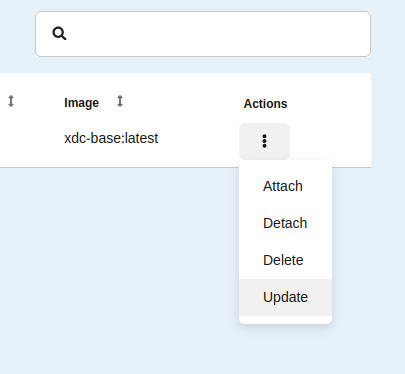
The expiration time can be configured on a per-entity basis in Launch as well. Find the row on the appropriate page and click the action menu
on the far right (three dots). Choose Update.
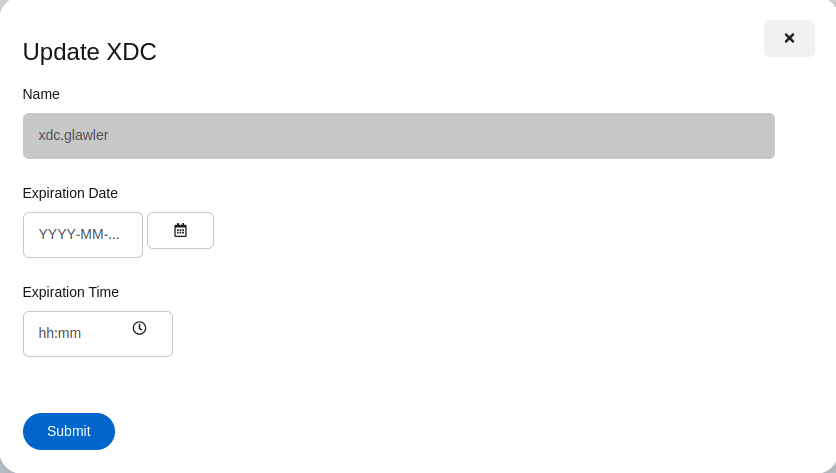
Launch will spawn dialog that lets a new expiration time be set.